> For the complete documentation index, see [llms.txt](https://zh.jego.pro/llms.txt). Markdown versions of documentation pages are available by appending `.md` to page URLs; this page is available as [Markdown](https://zh.jego.pro/shi-yong-jiao-cheng/mo-shi-xuan-ze.md).
# 模式选择
## 🆓免费版
 当你的无忧行处于上图所示的状态,就代表着你在使用无忧行为你提供的免费服务。
### 免费版浏览器图标状态:
V 1.3.20版本最新功能:
| 开启时 | 关闭时 |
| ------------------------------------------------------------------------------------------------------------------------------------------------------------------------------------------------------------------------------------------------------------ | ----------------------------------------------------------------------------------------------------------------------------------------------------------------------------------------------------------------------------------------------------------- |
|
当你的无忧行处于上图所示的状态,就代表着你在使用无忧行为你提供的免费服务。
### 免费版浏览器图标状态:
V 1.3.20版本最新功能:
| 开启时 | 关闭时 |
| ------------------------------------------------------------------------------------------------------------------------------------------------------------------------------------------------------------------------------------------------------------ | ----------------------------------------------------------------------------------------------------------------------------------------------------------------------------------------------------------------------------------------------------------- |
|  |
|  |
### 开启
当你的无忧行处于上图所示的状态(即开启按钮为选中状态),无忧行将为你提供免费的突破\~\~Google、\~\~维基百科、New Bing以及ChatGPT的服务。
### 关闭
当你点击关闭(即`关闭`按钮为选中状态),就代表着你关闭了浏览器的代理功能,访问任意网址都将使用你本地网络直接访问(此时无法访问Google、维基百科、New Bing以及ChatGPT的服务)。
## 🏆付费版
### 付费版浏览器图标状态:
V 1.3.20版本最新功能:
| 全局模式时 | 规则模式时 | 关闭时 |
| ------------------------------------------------------------------------------------------------------------------------------------------------------------------------------------------------------------------------------------------------------ | ------------------------------------------------------------------------------------------------------------------------------------------------------------------------------------------------------------------------------------------------------------ | ----------------------------------------------------------------------------------------------------------------------------------------------------------------------------------------------------------------------------------------------------------- |
|
|
### 开启
当你的无忧行处于上图所示的状态(即开启按钮为选中状态),无忧行将为你提供免费的突破\~\~Google、\~\~维基百科、New Bing以及ChatGPT的服务。
### 关闭
当你点击关闭(即`关闭`按钮为选中状态),就代表着你关闭了浏览器的代理功能,访问任意网址都将使用你本地网络直接访问(此时无法访问Google、维基百科、New Bing以及ChatGPT的服务)。
## 🏆付费版
### 付费版浏览器图标状态:
V 1.3.20版本最新功能:
| 全局模式时 | 规则模式时 | 关闭时 |
| ------------------------------------------------------------------------------------------------------------------------------------------------------------------------------------------------------------------------------------------------------ | ------------------------------------------------------------------------------------------------------------------------------------------------------------------------------------------------------------------------------------------------------------ | ----------------------------------------------------------------------------------------------------------------------------------------------------------------------------------------------------------------------------------------------------------- |
|  | | |
### 全局
| | |
### 全局
 当你的无忧行处于上图所示的状态(即全局按钮为选中状态),就代表着你使用浏览器的全局模式进行访问,访问任意网址都将经由代理(包括大陆地区的网站)。
### 规则
当你的无忧行处于上图所示的状态(即全局按钮为选中状态),就代表着你使用浏览器的全局模式进行访问,访问任意网址都将经由代理(包括大陆地区的网站)。
### 规则
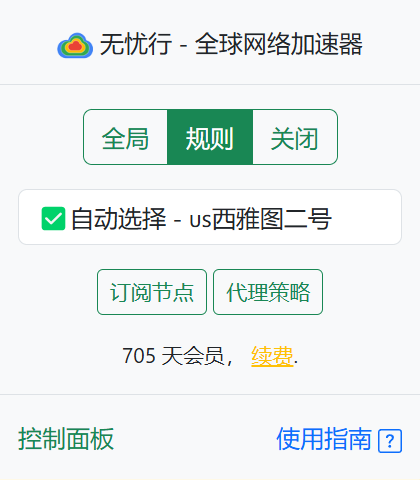 当你的无忧行处于上图所示的状态(即规则按钮为选中状态),就代表着你使用浏览器的规则模式进行访问,访问任意网址都将先经过无忧行内置的规则判断是否直接访问还是经由代理访问,大陆地区的网址将默认为直接连接,境外被屏蔽的网站设为经由代理服务器访问,享受自由且高速的冲浪。
### 关闭
当你的无忧行处于上图所示的状态(即规则按钮为选中状态),就代表着你使用浏览器的规则模式进行访问,访问任意网址都将先经过无忧行内置的规则判断是否直接访问还是经由代理访问,大陆地区的网址将默认为直接连接,境外被屏蔽的网站设为经由代理服务器访问,享受自由且高速的冲浪。
### 关闭
 当你的无忧行处于上图所示的状态(即`关闭`按钮为选中状态),就代表着你关闭了浏览器的代理功能,访问任意网址都将使用你本地网络直接访问(此时无法访问境外境外被屏蔽的网站)。